How to set up crypto alerts
on Discord in under 5 minutes
ChartScout sends real-time chart pattern alerts directly to your Discord DMs - no webhooks, no coding, no bot setup. Connect your Discord account in one click, configure your watchlist, and start receiving alerts for 23 detectors across 1,000+ crypto pairs within minutes. Most tools require webhook chains or developer APIs. ChartScout has native Discord integration built in.
Getting crypto alerts on Discord should not require a computer science degree. But if you have ever tried to set this up, you know the reality. Most tools either force you to configure webhooks manually, write code to build a bot, or settle for basic price alerts that tell you nothing about what is actually happening on the chart.
ChartScout takes a different approach. We built Discord integration directly into the scanner - not as an afterthought, not through a third-party webhook chain, but as a native feature that sends pattern alerts straight to your DMs. This guide walks through exactly how it works and why we built it this way.
If you are already familiar with alert-driven trading and just want to set up Discord alerts, skip to the step-by-step setup.
<5 min
From signup to first Discord alert
1,000+
Crypto pairs scanned across 5 exchanges
<20s
Pattern detection to Discord delivery
Why Discord for crypto alerts?
Discord has over 200 million monthly active users, and the crypto trading community is one of its largest non-gaming segments. If you already have Discord open for trading communities and alpha groups, adding your chart pattern alerts there eliminates an entire layer of context-switching from your workflow.
You're already there. Most crypto traders have Discord open all day for trading communities, alpha groups, and project announcements. Receiving alerts in the same app you already monitor means zero friction between notification and action. No new app to install, no new tab to keep open.
Native mobile push delivery. A ChartScout DM can use the same Discord notification path as a message from a friend, helping detections reach the devices and channels you already monitor.
Rich embeds make alerts scannable. Discord supports rich message embeds with formatted fields, colors, and links. ChartScout uses this to pack the pattern type, trading pair, exchange, timeframe, and a direct chart link into a single clean message. You get the full context at a glance without clicking through to another app.
Cross-platform by default. Discord runs on Windows, macOS, Linux, iOS, Android, and in the browser. Your alerts follow you to every device without configuring anything extra.
“Reducing the number of screens and tools a trader must monitor helps maintain focus and reduces decision fatigue. Fewer context switches mean clearer thinking when it matters.”
- Alexander Elder, The New Trading for a Living
That is exactly why we built Discord integration into ChartScout. Instead of monitoring a trading terminal, an email inbox, and a separate alert app, you receive everything in the platform where you already spend your time.
The problem with most Discord alert setups
Most crypto alert tools treat Discord as an afterthought. They bolt on notification support through workarounds that shift the engineering burden onto you, the trader. Here is what a typical setup looks like with most tools on the market.
Webhook-only integrations
The most common approach. The tool generates alerts internally, but to get them on Discord you need to create a webhook URL in your Discord server settings, paste it into the tool's configuration, and hope the chain does not break. Webhooks only post to channels, not DMs, so your alerts are visible to everyone in that channel. Each hop in the webhook chain adds 0.5-3 seconds of latency. If any link in the chain fails silently, you miss the alert entirely.
Developer APIs instead of user-facing features
Some platforms offer Discord and Telegram notifications through a developer API. Technically the feature exists, but using it requires writing code, managing API keys, hosting a server, and maintaining the integration yourself. These tools are built for developers, not traders. If you do not write code for a living, this option does not exist for you.
Price alerts only - no pattern detection
Some tools have excellent notification infrastructure - they can send to Discord, Telegram, SMS, email, even phone calls. But their alerts are limited to price levels, volume spikes, and funding rate changes. They cannot tell you that a head and shoulders pattern just formed on ETH/USDT 4H, because they have no pattern detection engine. They deliver notifications well. They just have nothing worth notifying you about if you trade patterns.
Minimum 5-minute delays
Even tools with strong technical analysis capabilities often have a minimum alert timeframe of 5 minutes. That means alerts are generated on a schedule, not in real time. By the time you receive the notification, the pattern has been forming for minutes and the optimal entry may already be gone.
The real gap in the market
No tool out there combines automated chart pattern detection with native, consumer-ready Discord delivery. Some have the detection but require you to be a developer to get alerts on Discord. Others have the notification infrastructure but only support price alerts. ChartScout is the only scanner that puts both together in a single, ready-to-use package.
How ChartScout handles Discord alerts differently
We did not bolt Discord support onto an existing product. We built it as a core feature from day one because trading without watching charts only works if alerts reach you instantly on the platform you already use.
Native bot integration, not webhooks
ChartScout connects to Discord through a native bot integration. You authorize it with one click through Discord's OAuth flow - the same authorization screen you see when adding any Discord app. No webhook URLs to copy, no server configuration, no middleware services to chain together.
Alerts go to your DMs, not a public channel
Your pattern alerts are sent directly to your personal Discord DMs. No one else can see what pairs you are monitoring, when you receive alerts, or what patterns triggered them. Your trading strategy stays private. This is a fundamental difference from webhook-based setups, which can only post to channels where everyone sees everything.
Under 20 seconds from detection to notification
Because detection and delivery happen on the same infrastructure, there are no webhook hops or intermediary processing queues. When a pattern completes, the alert is in your DMs within seconds. Compare that to the 60-180 seconds typical of webhook-chain setups where alerts pass through multiple services before reaching Discord.
23 detectors, 1,000+ pairs, 5 exchanges
ChartScout detects 23 detectors including double tops, head and shoulders, triangles, flags, wedges, channels, and crossovers across Binance, Bybit, KuCoin, MEXC, and Hyperliquid. Every detection is delivered to Discord automatically. You are not limited to a handful of popular pairs - if it trades on a supported exchange, ChartScout can scan it.
Zero maintenance
No code to maintain. No server to keep running. No API keys to rotate. No webhook URLs that break when a third-party service updates their API. You connect Discord once and it works. The infrastructure is our problem, not yours.
Step-by-step: setting up ChartScout Discord alerts
The entire setup takes under 5 minutes. You do not need a Discord server, you do not need to create a bot, and you do not need to touch a single line of code.
Step 1: Click “Connect” in your ChartScout settings
Sign up at chartscout.io and start the free 7-day Pro trial. Once you are in, go to Settings, open the Alert delivery tab, then click Connect next to Discord.
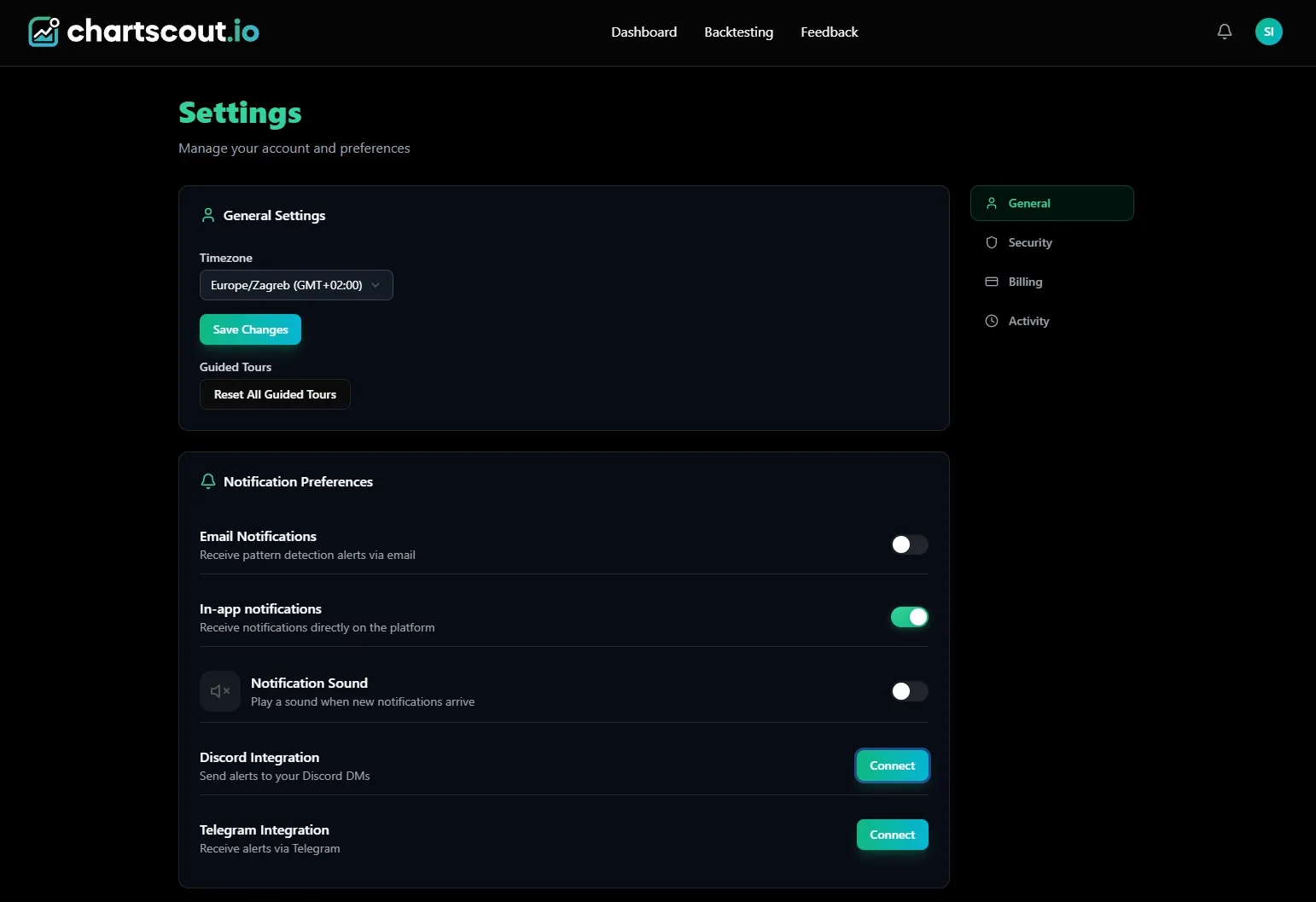
ChartScout settings page - Discord Integration with one-click Connect button
Step 2: Authorize on Discord
Clicking Connect opens Discord's standard OAuth authorization screen. It asks for permission to access your username and send you direct messages. Click “Authorize.” That is the only permission ChartScout needs - no access to your servers, no ability to read your messages, no admin rights.
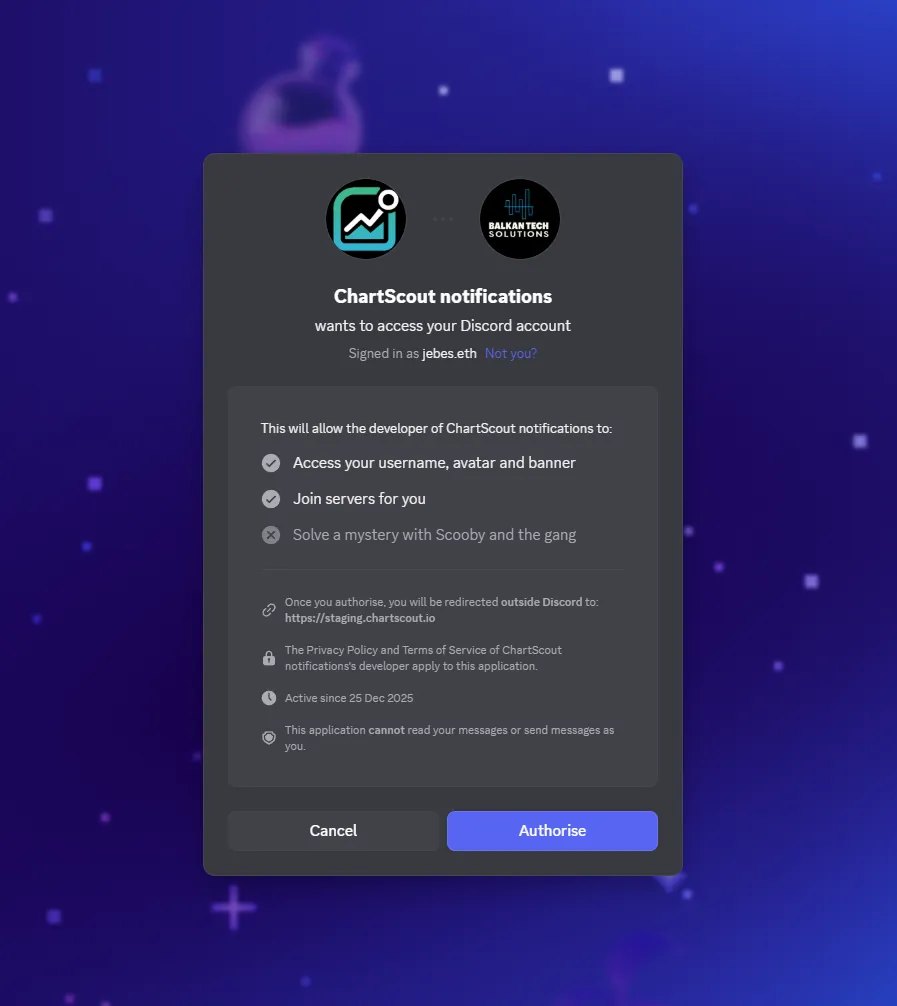
Discord OAuth screen - one click to authorize ChartScout notifications
Step 3: You're connected
After authorizing, you are redirected back to your ChartScout settings page. The Discord Integration section now shows a red “Disconnect” button, confirming the connection is live. A green toast notification confirms it: “Discord connected successfully!”
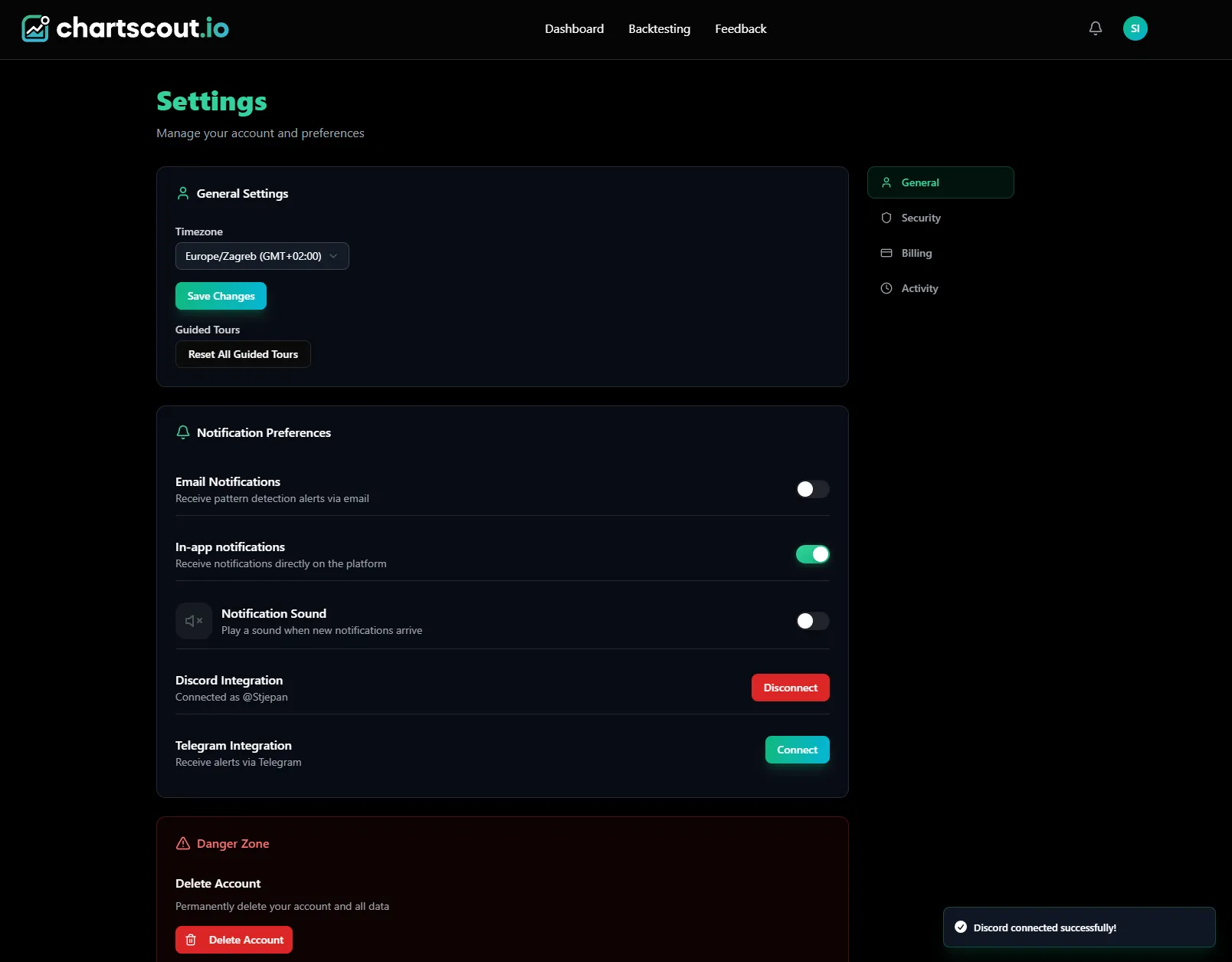
Settings page after connecting - Discord shows “Disconnect” and green success toast
Step 4: ChartScout greets you in Discord
Open Discord. You will have a new DM from the ChartScout bot confirming the connection. From this point on, every pattern detection matching your watchers is delivered to this DM thread automatically. No further setup needed.
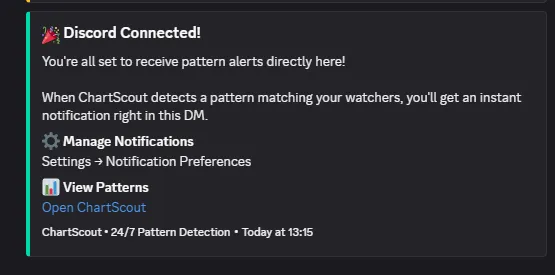
ChartScout bot greeting in your Discord DMs - you are ready to receive alerts
That is the entire process. Settings page, one OAuth click, done. If you ever want to stop Discord alerts, go back to settings and click “Disconnect.” No leftover bots, no webhook cleanup, no permissions to revoke manually.
Privacy note
All ChartScout alerts go to your personal DMs. No one else can see what pairs you are monitoring or when you receive notifications. Your watchlist and alert activity stay completely private.
What a ChartScout Discord alert includes
Every alert ChartScout sends to Discord is a rich embed containing everything you need to evaluate the setup without opening another app. Here is what each alert includes.
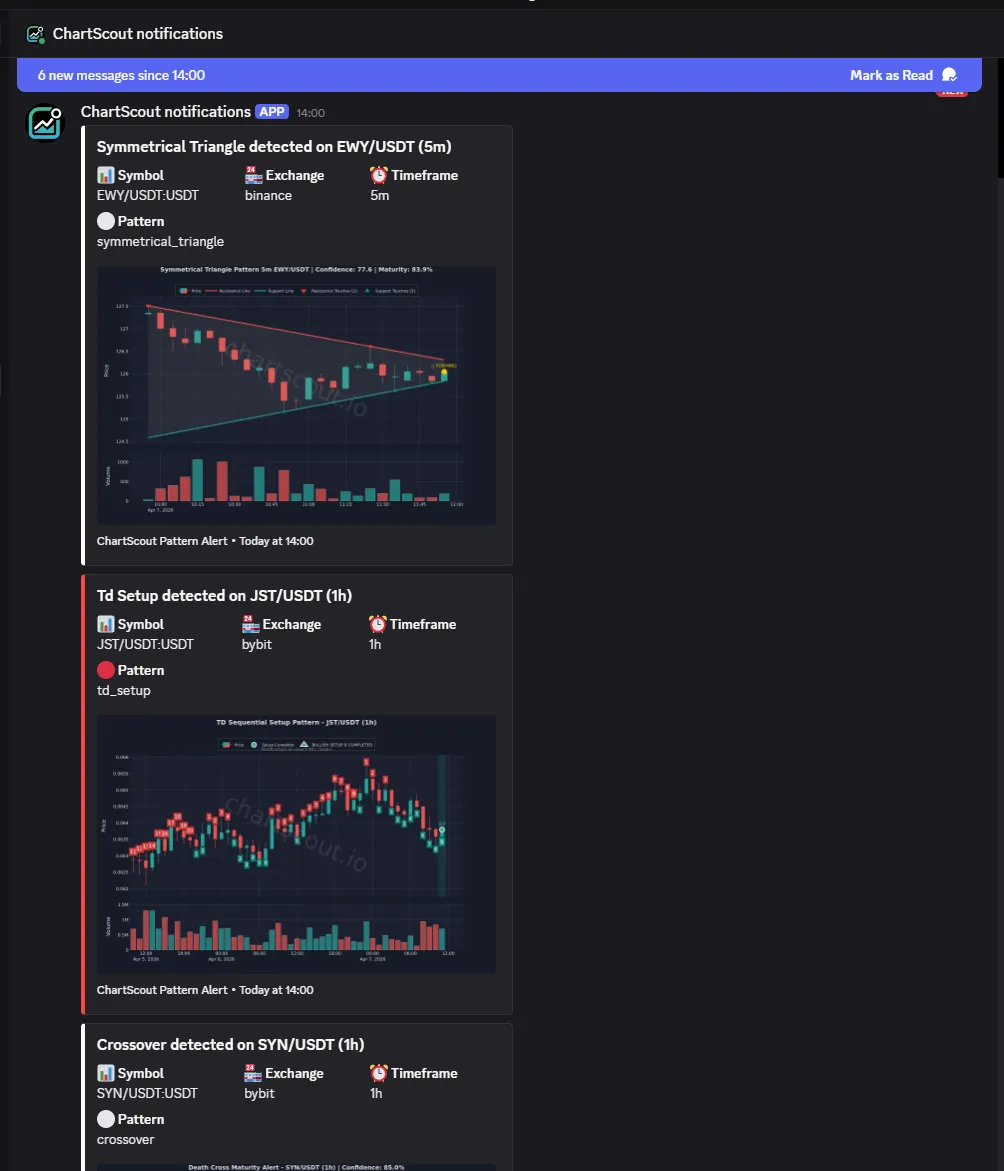
Real ChartScout alerts in Discord - each includes pattern type, pair, exchange, timeframe, and a chart with volume
Pattern type. The specific chart pattern detected - double top, ascending triangle, head and shoulders, bull flag, etc. You know exactly what formation triggered the alert, not just that “something happened.”
Trading pair and exchange. Which pair (BTC/USDT, ETH/USDT, SOL/USDT, etc.) and which exchange (Binance, Bybit, KuCoin, or MEXC) the pattern was detected on. No ambiguity about where to look.
Timeframe. The candlestick timeframe where the pattern formed (5m, 15m, 1h, 4h, 1d). Higher timeframes generally signal more significant moves, and having this in the alert lets you immediately assess the weight of the setup.
Volume inside the chart image. Every alert includes a chart snapshot with volume bars visible. This is crucial - a pattern without volume context is half the picture. You can immediately see whether the breakout candle came on above-average volume or whether it is a low-conviction move before you even open a charting platform.
Color-coded direction. Bullish patterns show a green accent line on the alert. Bearish patterns show red. You can glance at your Discord DMs and instantly know the direction of each detection without reading a word. Green means the pattern implies upside. Red means it implies downside.
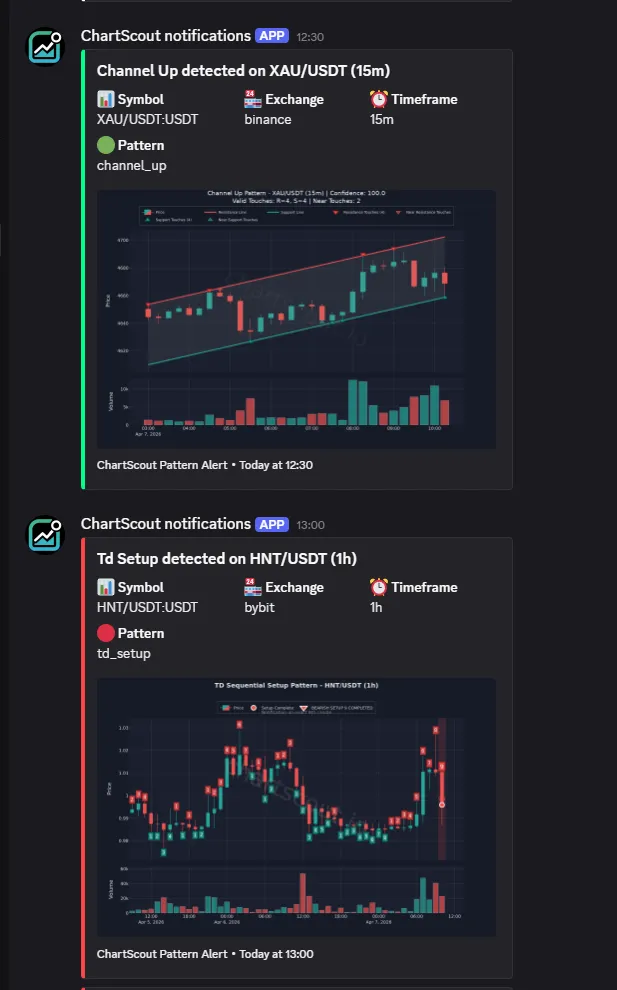
Green accent = bullish pattern (Channel Up). Red accent = bearish pattern. Instant visual clarity.
Direct chart link. A one-click link to view the chart directly. No searching through exchange interfaces to find the pair and timeframe - the alert takes you straight to the pattern.
A basic price alert says “BTC dropped to $68,000.” A ChartScout alert says “Double top detected on BTC/USDT 4H on Binance” with a chart image showing volume and a direct link. The second gives you structured context to review; it is not a trade instruction or outcome prediction.
Price alerts vs. pattern alerts
Most Discord crypto alert tools only support price alerts. It is important to understand why that is not enough if you trade based on technical analysis.
$Price alerts
Notify you when an asset crosses a specific price. Example: “Alert me when BTC hits $72,000.”
- Simple to configure
- Available on most platforms
- You must know which price to watch
- No context about what is happening technically
△Pattern alerts (ChartScout)
Notify you when a chart pattern forms. Example: “Double top detected on ETH/USDT 4H.”
- Identifies specific trade setups automatically
- Scans 1,000+ pairs so you don't have to
- Tells you what is forming and what it means
- Delivers the trade thesis, not just a number
“Chart patterns provide something raw price data cannot: a framework for understanding the balance of supply and demand at specific price levels. A pattern is not just a shape on a chart - it reflects the collective behavior of buyers and sellers.”
- John Murphy, Technical Analysis of the Financial Markets
This is the core reason ChartScout exists. Price alerts tell you what happened. Pattern alerts tell you what is forming and what it implies. If you trade based on chart patterns - double tops, ascending triangles, breakout setups - you need a tool that detects them, not one that just watches a price level.
Discord vs. Telegram: which alert channel to pick
ChartScout supports both Telegram and Discord for alert delivery, plus email and in-app notifications. You can use multiple channels simultaneously. Here is how Discord and Telegram compare.
| Feature | Discord | Telegram |
|---|---|---|
| Delivery speed | 1-3 seconds | 1-3 seconds |
| Message format | Rich embeds (formatted fields, colors) | Formatted text with inline links |
| Mobile notifications | Push notifications | Push notifications |
| Desktop app | Yes (all platforms) | Yes (all platforms) |
| Best for | Traders already in Discord communities | Traders who prefer a lighter app |
| Setup with ChartScout | One-click OAuth | One-click bot connection |
Key takeaway
There is no wrong choice. Both deliver ChartScout alerts at the same speed with the same pattern data. Pick the platform you already use, or enable both and let ChartScout send to wherever you are. The detection speed - under 20 seconds - is the same regardless of which channel delivers the alert.
Chart pattern alerts, directly in your Discord DMs.
23 detectors. 1,000+ pairs. 5 exchanges. Under 20 seconds. No code required.
Start a Free 7-Day TrialFrequently asked questions
How long does it take to set up crypto alerts on Discord with ChartScout?
Under 5 minutes from creating your account to receiving your first alert. Connect Discord with one click, configure your watchers, and you are done. No webhooks, no bot tokens, no coding.
Do I need to create a Discord server to receive crypto alerts?
No. ChartScout sends alerts directly to your personal Discord DMs. You do not need a server, a channel, or any Discord admin permissions. Just a Discord account.
Can I get chart pattern alerts on Discord without coding?
Yes. ChartScout is fully point-and-click. You connect Discord through a standard OAuth flow, select your trading pairs, timeframes, and patterns through a visual interface, and alerts start arriving. No Python, no JavaScript, no API keys.
How fast do ChartScout Discord alerts arrive?
Under 20 seconds from pattern detection to your Discord DM. Because ChartScout uses a native Discord integration rather than a webhook chain, there are no intermediary delays. Detection and delivery happen on the same infrastructure.
What chart patterns does ChartScout detect on Discord?
ChartScout detects 23 detectors: Ascending Triangle, Falling Wedge, Channel Up, Double Bottom, Bull Flag, Bull Pennant, Double Top, Descending Triangle, Channel Down, Rising Wedge, Bear Flag, Bear Pennant, Head and Shoulders, Inverse Head and Shoulders, Triple Bottom, Triple Top, Symmetrical Triangle, Cup and Handle, Inverse Cup and Handle, Crossover, TD Setup, TD Countdown, Falling Knife Reversal.
Should I use Discord or Telegram for ChartScout alerts?
Both deliver the same alerts at the same speed. Choose whichever platform you already use, or enable both. Discord offers richer message formatting while Telegram is lighter. There is no performance difference.
Are ChartScout Discord alerts private?
Yes. All alerts go to your personal DMs. No one else can see your alerts, your watchlist, or which pairs you are monitoring. Unlike webhook-based tools that post to public channels, ChartScout keeps your alert activity private.
Can I get alerts on both Discord and Telegram at the same time?
Yes. ChartScout supports Discord, Telegram, email, and in-app notifications simultaneously. You can enable any combination. The same alert is sent to all enabled channels within seconds of detection.
Sources & references
The setup steps are based on ChartScout's native Discord integration. The trading and chart-pattern context follows the reference works below.
- Murphy, John J. Technical Analysis of the Financial Markets. New York Institute of Finance, 1999. ISBN: 978-0735200661.
Reference for chart-pattern confirmation and technical-analysis terminology used throughout the guide. - Elder, Alexander. The New Trading for a Living. John Wiley & Sons, 2014. ISBN: 978-1118443927.
Reference for alert-driven workflows, trade planning, and risk discipline.
Related guides
Alert-driven trading guide
Why smart traders use alerts instead of staring at charts all day.
Why crypto alerts are always late
The engineering behind alert latency and how to minimize it.
Chart patterns and volume analysis
How to use volume to confirm the patterns ChartScout detects.
How to scan crypto for chart patterns
The complete guide to automated chart pattern scanning.
Head and shoulders pattern
81% success rate - one of the most reliable reversal patterns.
How to read crypto charts
Beginner-friendly guide to understanding candlestick charts.

Stjepan Ivanović
Founder of ChartScout · Crypto Trader Since 2013
Trading crypto since 2013 with his first Bitcoin bought at ~$200. Four complete bull/bear market cycles, traded on early exchanges like Mt.Gox and BTC-e, on-chain trading on IDEX and EtherDelta, and ~70 crypto project investments. Built ChartScout after 23+ months of development to automate what no trader can do manually. Watch hundreds of charts 24/7.